
Telegram application is one of the best social network software that you can use in your smartphone. It became popular because it has high security and speed on sending files. You can send text to your friend or upload picture quickly. One of the Telegram unique feature is that you can create groups and channels for your business, but at first you should create Telegram account and then use these features easily.
I’m Jack Ricle from Telegram adviser company in this article i wanna show you how to create a Telegram Account. Stay with us. Pavel Durov is founder of Telegram messenger and he is from Russian also his main skill is computer engineering. He was born in Saint Petersburg of Russia, on October 5. When he was a teenager, was interested in technology and computer. For more information you can visit his official page on Twitter, Facebook and other social media.
Steps To Create Telegram Account
1- Install the Telegram application (android, iOS or windows version):
- If you are using android operating system you should install Telegram from Google Play Store.
- Also, If you have apple devise like iPhone, iPad or MacBook you should download app from App Store.
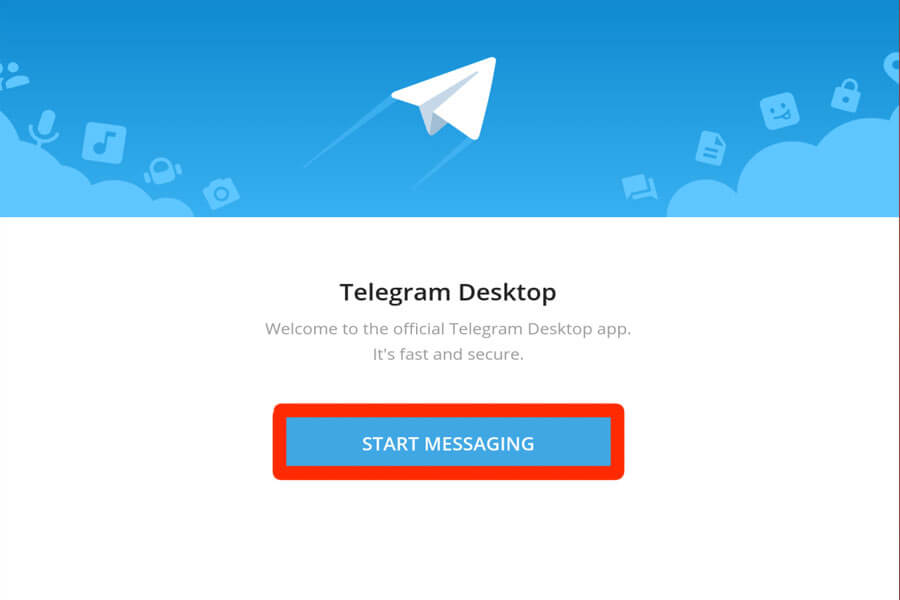
- Finally, if you want to install Telegram app on windows (7,8,10) you should download it from Telegram desktop.
| Read More: How To Create Bulk Telegram Accounts? |
Please notice that after install app you have to update it in future because of security issues. When you run Telegram app for the first time, you will see this page. click “start messaging” button.
2- Insert your country name, area code and phone number:
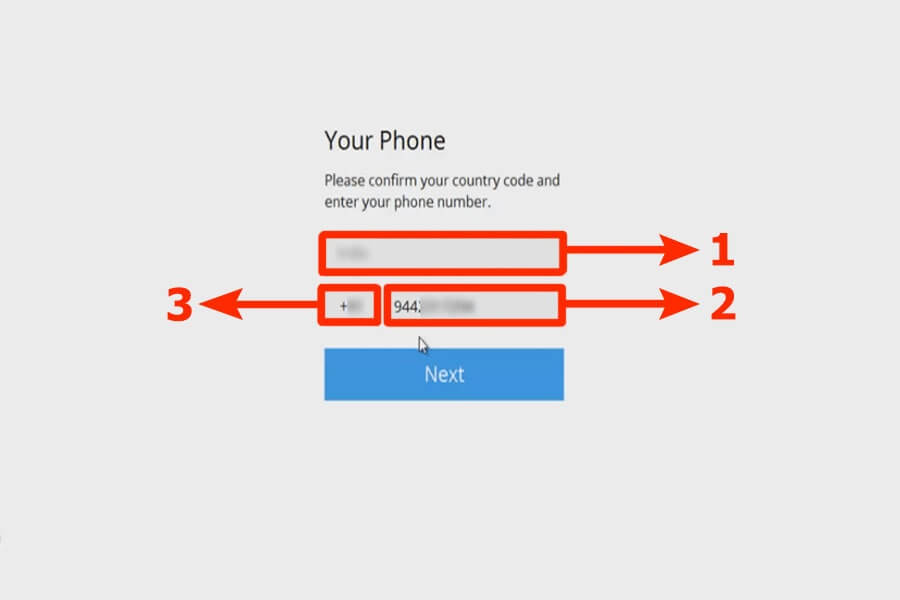
In this step you need to insert your phone number detail and notice that this phone number will be use for your new account.
Your audience can see that while you are chatting with them. In field number 1 you should choose your country, after that you can insert your number in field 2.
Section 3 will be completed automatically after you select country name. finally click the “Next” button.
3- Insert the confirmation code:
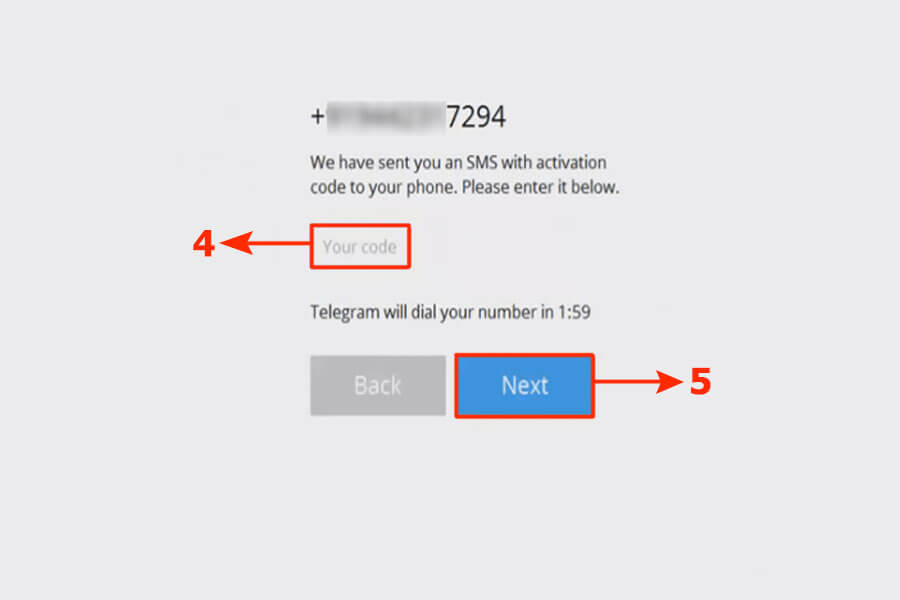
in this step you will receive a code via SMS, insert that code in field number 4 and then tap the “Next” button.
Warning! Never tell your confirmation code to anyone else.
4- Add your name:
In this section, Telegram will ask you to set your first and last name. Enter this information to continue.
Well done! Your Telegram account is ready. The process of creating multiple Telegram accounts is the same for both Android and iOS devices. To set your profile picture and username, you can go to the settings page. I hope this article about creating a Telegram account was useful for you.
Well done! You successfully create new account on Telegram app. now you can find your friends on Telegram and start chat.
- Now you can create Telegram channel or group with your account.
- You can stay in touch with your friends by Telegram voice call.
- Enjoy a secure communication environment.
| Read More: How To Create More Than 10 Telegram Accounts? |
Kilka lat temu mialem konto w teelgramie. Najprawdopodobniej usunąłem, Teraz chciałbym wrócić, niestety nie otrzymuję kodu po wprowadzeniu numeru telefonu
Hi there,
I’m looking for a way to create a Telegram account on my Android phone. I’ve seen a few guides online, but they all seem to be for IOS. Is there a guide for Android users too
Hello, Please contact to support
bandau susikurti telegram paskyra, nurodau savo tel.nr. ir laukiu codo, kurio taip ir negaunu. kodel?
Great guide! I found the step-by-step instructions really helpful, especially for setting it up on Windows. Excited to start using Telegram for my group chats! Thank you for sharing!
Great guide! I found the step-by-step instructions really helpful, especially the tips for privacy settings. Can’t wait to start using Telegram!
Great guide! I found the step-by-step instructions really helpful, especially the tips for verifying my phone number. I can’t wait to start using Telegram for my chats!
Great post! I found the step-by-step instructions really helpful, especially for setting up my account on different devices. Can’t wait to start using Telegram for my chats! Thanks for sharing!
Great post! I found the step-by-step instructions really helpful, especially the tips for ensuring privacy settings are on point. Can’t wait to start using Telegram!
Thanks for the detailed guide! I found the step-by-step instructions really useful for setting up my Telegram account on all my devices. The screenshots made it so easy to follow along. Can’t wait to start using it to connect with friends!